Fewer dead-ends: leave dashboard mode, define your own numbers, no stuck tiles
You can back out of building a dashboard. If Oasis offers to build one and you would rather keep asking questions, there is now a 'Not now' button, and simply asking a different question gets you out too. Before, a chat could get stuck where every reply tried to build a dashboard no matter what you typed.
Describe your own number and use it right away. When you define a figure Oasis does not already track (like a 'total price' that adds up several fields), it now shows it as a usable provisional number instead of refusing with a 'not a certified metric' error. Oasis also explains plainly how a number becomes verified (a team lead confirms it with 'This matches a report I trust'), instead of pointing you to a button that was not there.
Dashboard tiles always finish. A tile that cannot load now shows a clear message with a 'Try again' button instead of spinning on 'Building...' forever.
Your Brief: a home page for the numbers you track
The Dashboards area now opens on your Brief - one overview of the numbers you care about - instead of a list of boards to click through.
It leads with what needs you. Anything that moved sharply or is off track surfaces in a 'Needs your attention' band at the top, each with a short note and a link to dig in.
New here? Your Brief comes pre-filled for your role. An executive, an estimator, and a purchasing manager each start with a different set of the right numbers and charts, so it is useful on day one.
Make it yours. Pin any tile from any board to your Brief, click a tile to jump to the board it came from, and use Customize to reorder or remove tiles.
Cleaner, easier-to-read design across every board. Tiles have a more polished look, large dollar figures are shortened (like $44.9M), and columns of numbers line up so a board is quicker to scan.
Answer a Tile to Build It, and Cleaner Chart Choices
Answering a tile that needs a definition now actually builds it. When a tile reads 'Needs your input', typing the definition (or picking one of the offered options) in Refine now defines the measure, checks it, and fills in the number - instead of only opening the panel. If the answer still cannot be worked out, the tile keeps asking rather than showing a wrong number.
The chart-type picker no longer offers a choice that will not stick. On a tile that compares to a prior period, chart types that cannot show a comparison (like a plain table) are greyed out with the reason, instead of letting you pick one that silently snaps back.
Reshape Any Board by Asking - and See What You're Building First
New Refine panel for a built board. Open it from any board and tell Oasis what to change in plain English - regroup the tiles, change the time window, add or remove a tile, rename it - and the board rebuilds while you watch. The panel carries a summary of the original chat that created the board, so Oasis has the full context of what you were after.
Refine one tile at a time. Pick a single tile and change just that one: switch its chart type from a set of one-click choices, or change what it measures, how it's broken down, its time period, its sort, or how many rows it shows. Chart types that would not read well for that tile's data are greyed out with the reason.
See what each tile will be before you build. The 'build this dashboard?' card now shows a small preview of every tile's actual shape - a metric card, a bar chart, a table, a trend line - with a plain-English line describing it (like 'Bar - sales by community this year'), so you can decide to build it, adjust it, or start over.
Assumptions are out of your way. The list of how Oasis defined things no longer sits on top of a board while it builds. It is tucked into a 'how this tile is built' panel inside Refine, on demand, right where you would change it.
A tile that needs a definition is now answerable in place. Instead of an Answer button that dropped you on the dashboards list, the tile shows a clear 'Needs your input' card with the question and one-click choices, and 'Answer this...' opens the Refine panel focused on that tile with the question ready.
Filtering a board is easier to figure out. The plain-English filter box suggests real examples off your own board, a 'What can I filter?' link spells out what's allowed, near-misses are caught ('No Woodhavn on this board - did you mean Woodhaven?'), and you can now match partial text (like 'vendor contains Acme').
Cleaner results and no blank tiles. A tile with no rows now says so plainly instead of showing nothing, pie charts with too many slices get grouped toward an 'Other' slice or nudged to a bar chart, and charts label their units.
Your dashboard plans now stay in the chat. Building or revising a board no longer makes the earlier plan card disappear - each plan stays in the conversation as history, so you can look back at what you asked for and how it changed.
Turn Your Chat Analysis Into a Dashboard
When you work through a question in chat - say you dig into where your purchase-order dollars are leaking - and then ask Oasis to 'build a dashboard for this', it now builds the board from that actual analysis. Before, it ignored the conversation and put up a generic executive board (sales, starts, completions) that had nothing to do with what you had just looked at.
If Oasis cannot turn your analysis into a board, it now names the findings it saw and asks which ones to turn into tiles - instead of quietly filling the board with unrelated numbers. An honest question beats a wrong board.
The most involved results - the kind of custom query you and Oasis refined together in chat - now come across as an 'As run in your chat' tile that reproduces that exact query, so the number on the board matches the number you already checked. These tiles are marked as first-pass rather than a certified metric, and they refresh on their own.
Build a Board on Any Topic - With Honest, Self-Checking Numbers
The board builder is no longer limited to a short list of blessed metrics. Ask for a board on any part of the business - purchasing, warranty, land, whatever you need - and Oasis builds it right away instead of coming back with a wall of 'Could not build' tiles.
Numbers Oasis had to make a judgment call on are labeled Provisional, in amber, with the assumption spelled out on the tile (for example 'assumes committed cost = open purchase orders only'). You always know which figures are settled and which are a first pass, so a working number is never mistaken for a confirmed one.
When a number genuinely cannot be worked out yet, the tile says 'This needs a definition' and asks the one question it needs answered - instead of quietly filling the space with an unrelated number. An honest gap beats a wrong board.
Every tile now carries a simple trust badge: a green Verified check for settled definitions, an amber Provisional tag for first-pass ones, and a loud red banner if a number fails a check when it refreshes. The banner keeps showing the last good figure with its date ('Showing Jul 12 data - a check failed on refresh') and quietly flags it for the team to look at.
Behind the scenes, Oasis now checks each new definition on its own: it re-derives the number a second way, reads the query back into plain English to confirm it answers the question asked, and confirms the parts of a breakdown still add up to the firm-wide total on every refresh. Definitions that pass keep earning trust; ones that stop reconciling get flagged automatically.
Owners can confirm a Provisional number with one click - 'This matches a report I trust' - which promotes it to Verified for everyone. Anyone can click the small info icon on a tile to see exactly which checks ran, when, and what each one found.
New definitions are watched quietly for a couple of weeks before any of this changes a badge on its own, so the roll-out is careful and nothing gets mislabeled while the checks settle in.
Dashboard Quality Pass: Numbers You Can Trust, Everywhere
Fixed a case where two tiles on the same board disagreed about the same number: the headline Sales card could overstate a year-over-year decline because it measured a slightly different date window than the comparison table below it. Every tile on a board now measures each metric against that metric's own latest data, so the headline and the detail always agree.
Asking to change the time window (like 'show the pipeline for the next 6 months') now only changes the tiles it should. Previously it could quietly switch year-to-date actuals tiles onto a scheduled-plan window while their titles still said YTD.
Answering the clarifying question a board plan asks now updates the plan, instead of being treated as a brand-new question. And once a board is built, the plan card says so with an Open board link - even after a reload - so you can't accidentally build it twice.
Plans are now checked against the data before you see them: a tile the system could not actually build gets repaired (split into buildable pieces) or honestly listed under Not included, in plain English.
Boards read faster: definitions collapsed into one line with a View definitions expander and a review prompt for anything Oasis assumed; every number tile shows the date its data runs through; month columns read chronologically as 'Jul 2026'; the biggest division sorts first in pipeline tables; firm-wide totals sit bolded at the bottom of every breakdown.
Clicking a bar on the Who's Up / Down chart now filters the rest of the board, filters keep showing your current numbers while they update, and typing a community or division name into the plain-English filter box just works.
The Dashboards page teaches itself: a New board button, a compact scannable list of your boards with who built them and when, and clearer messages everywhere - no more engineering jargon in any explanation.
Faster Reports and New One-Click Summaries
Heavy questions - build-cost estimates, monthly summaries, backlog - come back much faster and no longer run out of time before answering. Oasis used to re-scan the database structure on nearly every question; it now goes straight to pulling the numbers.
New one-click cost-to-build estimate for a plan. Ask what it costs to build a given plan (optionally in a specific community) and Oasis returns a trade-by-trade budget from comparable homes. It uses the typical (median) budgeted cost, so one unusual or half-finished home no longer skews the estimate.
New monthly report and backlog summary. Ask for a month's sales, starts, closings and gross margin, or backlog by community with contract value and margin, and Oasis returns the whole report in one step with the same definition every time.
Board Builder Polish: More Charts, Tighter Layout, Working Edits
Boards Oasis builds now favor charts. Breakdowns like 'sales by division' arrive as ranked bar charts instead of tables, with the firm-wide total confirmed in a plain-English line under the chart. Ask for a table and you still get one.
Tiles now size themselves to their content. No more huge empty space under a short note, no more tables cut off at five rows with the rest hidden - a nine-division rollup shows all nine. Rows of tiles also fill the full width of the board instead of leaving a blank hole on the right.
'Add charts to all these tiles' now works. Asking the board refiner to change how tiles look converts every tile that supports it and tells you exactly which tiles it changed and which it skipped, and why.
The 'Edit this tile' panel's chart-type change now responds. Asking for 'show this as a bar chart' previously thought for a while and went silent; it now previews the change like any other edit.
Up is green again. Year-over-year variance tables had the colors backwards - divisions that improved showed red and declines showed green. Fixed everywhere, including the Up/Flat/Down labels.
Conversations that build a dashboard now get a proper name in your sidebar (the board's name) instead of staying 'New Conversation'.
Ask Oasis to Build You a Whole Dashboard
You can now describe an entire dashboard in one message - for example 'build me a dashboard called Sales Starts Completions with a firm-wide and by-division breakdown of sales, starts, and completions, upcoming for the next 12 months, plus year-over-year' - and Oasis builds the whole board. It shows you its plan first, including exactly how it defines each number (like 'sale = homeowner site authorization'), so you can correct anything before it builds.
Boards Oasis builds show their math. Breakdown tables carry a firm-wide total row plus a plain-English line confirming the rows add up to it. Every tile shows its as-of date. Forward-looking tiles are clearly labeled as scheduled plans, not actuals. And if part of a request can't be built from real data (like comparing to sales goals when no goals are loaded), Oasis says so honestly instead of inventing a number.
New boards start as a private draft only you can see. Review it, then save it to share, or discard it.
Refine a built board by asking: 'change the breakdown to community', 'add a tile for closings', or 'rename the board'. Oasis rebuilds just the affected tiles and tells you exactly what it changed and what it skipped.
Boards now stay fresh on their own. Tiles refresh on their schedule without anyone opening the board, alerts fire even when nobody is watching, and scheduled board emails refresh their numbers right before sending instead of mailing stale data.
Filters and chart clicks now re-scope the whole board, including the rollup tables with total rows, and repeated filtering is much faster thanks to smart caching.
Any board plan can be saved as a template and rebuilt later with one click.
Reliability fixes: saved board layouts and board filters no longer get lost after a reload, and edited tiles no longer risk breaking on their next refresh.
Control SharePoint Folder Access by Role
Admins can now choose exactly which SharePoint folders each role can open, right from the Roles screen. It browses your real SharePoint folders live, so you allow or block them by name instead of guessing.
Two simple modes per role: block specific folders (the role sees everything else), or restrict a role to just the folders you pick (everything else is hidden). Blocking always wins, and the screen warns you before it locks a role down to an allowlist.
Nothing changes on its own. Every role keeps the same document access it has today until an admin narrows it. This closes a gap where the assistant applied the same SharePoint access to everyone, regardless of role.
Two New Board Visuals and True Drill-Through
New construction-schedule timeline (Gantt). Show activities as bars across a real date axis, start to finish per task or home, straight from your schedule data. Milestones show as markers, and rows with missing dates are dropped rather than guessed.
New map. Plot homes or communities on a real street map, colored by community or status, using the coordinates already in your data. The map background is drawn from OpenStreetMap.
Click a number and see the actual records behind it. Drilling into a total now opens the underlying rows (the homes, POs, or line items that make it up), capped at 100, with a line confirming they add up to the total. For a few complex reports where that cannot be done safely, it shows the grouped summary instead and tells you so.
Boards Look Ahead: Forecasts, What-Changed, and Unusual-Number Flags
Ask Oasis to project a trend. For a time series like monthly closings or revenue, it can now extend the line forward a few periods using a plain trend or moving average. Projected points are drawn and labeled as estimates, kept clearly separate from actuals, never mixed in.
A tile can tell you what changed since the last refresh, in one plain sentence: 'Backlog down 42% since the last refresh, now $2.9M', so you see the movement without comparing old screenshots.
A subtle flag when a number looks unusual. If a figure lands well outside its own recent range, the tile quietly notes it (for example '40% above its recent norm') so a surprise doesn't slip by. It stays quiet unless there is enough history and the move is real, to avoid false alarms.
Scheduled Board Emails, Alerts That Watch Every Row, and Certified Numbers
Have a board emailed to you on a schedule. Set any board to arrive as a PDF every morning, week, or month, to whoever you list, at a time and time zone you pick. There is a 'Send test now' button so you can check it before it goes out. (Delivery switches on for your site once email and rendering are enabled.)
Alerts can now watch every row of a report, not just one number. You can say 'tell me if any community goes over budget by 10%' or 'if any vendor is more than $50k over', and the alert fires when any row crosses the line and names exactly which ones (for example 'Maple 15%, Woodhaven 12%'). Requests like these used to be turned away; now they work.
Core numbers stay consistent. An admin can now set the official definition of a metric like backlog, gross margin, or starts, so Oasis reuses that one definition everywhere instead of working it out slightly differently each time. A definition only goes live once it is marked verified.
Dashboards Are Now Interactive: Filter, Click to Explore, and Set Alerts
Filter a whole board at once. Pick a community, plan, date range, or status from the bar at the top of a board, or just type what you want in plain English, and every compatible tile re-scopes together. Tiles that do not have that field say 'not affected by this filter' instead of quietly showing the wrong thing.
Click to explore. Click a bar or a table row and the rest of the board focuses on that value, with a banner showing what you picked and a one-click Clear. If nothing else on the board uses that field, it tells you plainly instead of pretending something changed.
See the detail behind a number. After you click a value, open that tile to see the rows behind it, with a line confirming they add up to the headline figure.
Set alerts on any number. Tell a board to watch a figure (backlog, closings this month, a budget variance) and get an email when it crosses a line you choose. You can now also set alerts just for yourself on any board you can open, even ones you did not create, and they stay private to you.
Richer visuals and edit-by-asking. Boards can now show trend KPIs with a sparkline, over/under color-coded variance tables, pivot tables with totals, and sales funnels. You can also reshape a saved tile just by asking, for example 'make this a line chart' or 'only show this year'.
Big Questions Recover Instead of Dead-Ending
When a complex question took too long to fully finish, Oasis used to give up with a message like 'I ran out of processing steps' and show you nothing, even though it had already gathered real data. Now it presents what it found as a proper table or chart instead of a dead end.
If a question is too broad to finish in time, Oasis now tells you plainly and asks you to narrow it down (for example to one office, project, or time period), instead of showing a confusing technical message that listed database tables and asked you to choose one.
A few advanced reports that combine data in more involved ways were being blocked by an over-cautious safety check. Those now run, so questions that rely on them no longer fail or have to retry several times before working.
New One-Click Reports and On-Demand Option Popularity
New quick lookups you can just ask for: current vendor or product pricing, a plan's square footage and bed and bath counts, contact info for a job or buyer, the typical cost of a 3rd-car garage, and how much you have paid a vendor so far this year. These come back faster and more consistently than before.
New 'most popular options' report: for any community, see the share of homes that chose each upgrade, including the ones that never sell, with a keep-or-cut suggestion. Asking for 'most popular options' also no longer accidentally builds a single-buyer spec book.
New sell-out projection: for a community, see the recent sales pace, how many homes are left, the projected sell-out date, and the implied timing for starting the next phase.
Dashboard tiles now keep a history of their numbers and show a small trend line, so you can see how a figure has moved over time instead of only its latest value.
Answers Now Appear on Their Own, No Refresh Needed
After you asked a question, the screen could sometimes sit showing only your question, as if nothing happened, when in fact Oasis had finished and saved the answer. Refreshing the page brought it back, but until you did, it looked stuck.
This happened when the live connection between your browser and Oasis dropped at the exact moment the answer was being handed over. Oasis already tries to recover on its own in this situation, but in one specific case it gave up a moment too early and left you on your question until you reloaded.
Oasis now stays patient in that case and drops the finished answer in as soon as it is ready, so you no longer have to refresh to see it.
Correct Percentages, Self-Healing Chats, and Honest File Uploads
Percentages now show the right value. Some results, like gross margin, were displaying a percentage 100 times too small (for example 0.2% when the real figure was 21.6%). Any result that shows a percentage, including the paint color popularity report, now shows the correct number.
A conversation can no longer get permanently stuck on an error. Before, if a message hit a certain error, every later message in that same conversation kept failing with 'the request was rejected' until you gave up and started a new chat. These conversations now recover on their own, and any conversation that was already stuck works again when you reopen it.
Uploading a spreadsheet now gives you honest feedback. Before, if Oasis could not read a file you attached (for example a formatted summary report rather than a plain table), it stayed silent and then acted as if the data was available, which led nowhere. Now it tells you the file could not be read and suggests re-saving it as a simple one-sheet CSV.
Finding Client Documents in SharePoint No Longer Falsely Blocks You
When you asked Oasis for a client's construction or pre-construction documents, it could wrongly tell you that you did not have access to a folder you can actually open. The real cause was a name mismatch: Oasis guessed the folder's name with slightly different spacing or numbering (for example "PreConstruction" instead of "2. Pre Construction") and treated the miss as a permission block.
Oasis now browses the document library from the top to find the exact folder names instead of guessing, so it stops locking you out of folders you can read. If a name still does not match, it tells you plainly that it is a name or location mismatch and shows you the folders you can open, instead of a misleading "access denied."
Save Full Reports to a Board, Not Just Single Charts
You can now save a complete result to a board, even when it has several parts. Before, only a simple result with one chart or one table could be tracked. The moment you tried to save a richer answer, like a summary with a few metrics plus a chart and a detail table, it failed with a vague error. Now the whole thing saves as one live tile, and every part stays up to date on its own.
The 'This looks worth tracking' suggestion now actually works. Oasis tends to offer it on exactly the meatier results that used to be impossible to save, so the button looked broken. It now saves the result the same way the Track button does.
Boards now remember how you arrange them. Moving and resizing tiles was quietly failing to save in the background, so a board could snap back to its old layout. Your arrangement now sticks.
Oasis Now Works Properly on Phones and Tablets
Answers no longer get cut off on the right edge on a phone. Long explanations, the data-notes box, and the follow-up question suggestions now wrap to fit your screen instead of running off the side where you could not read them.
Tables, charts, and the metric cards now fit a phone screen. Wide tables scroll sideways on their own without dragging the whole page around, charts stay readable instead of shrinking to slivers, and the number cards stack one per row so the labels are no longer squeezed.
Typing a question no longer zooms the page on an iPhone or iPad. Before, tapping the question box would zoom the whole screen and leave it stuck zoomed in after every message.
The buttons are now finger-sized, and you can rename, pin, or delete a conversation on a touch screen, which was not possible before because those controls only appeared when hovering with a mouse.
The top bar is cleaner on a phone. The extra items now live in a single menu button, which is also where you will now find the link to Dashboards on a phone.
The conversation list now scrolls all the way to the bottom on a phone, so your shared views at the end of the list are reachable.
The Share window is usable on a phone now, with separate tabs to set up the share and preview it instead of everything crammed together.
Sales Appointments and Leads Now Answer From HubSpot
When you ask about sales appointments, leads, or anything 'by office,' Oasis now pulls from HubSpot, where that information actually lives, instead of mistakenly using Mark Systems. Before this, a question like 'how many sales appointments did we have this month by office' could quietly answer from the wrong system and give numbers that did not match HubSpot.
Appointment counts are correct even after a deal moves forward. Oasis now counts every deal that reached the Appt Scheduled stage during the period, not just the ones sitting in that stage at the moment you ask, so appointments that have since advanced are no longer missed.
Office and market breakdowns are accurate. Oasis uses each deal's own office/territory instead of guessing the office from the deal's name, which had been undercounting some divisions (for example, deals labeled by county were not rolling up to the right office).
Oasis reads the words more carefully too. 'Sales appointment,' 'lead,' and 'office' now point to the right HubSpot data, while everyday building terms that happen to share those words, like a lead carpenter, a material's lead time, or a home-office room in a floor plan, still go to the right place and are not mistaken for sales data.
Share the Analysis, Not Just the Charts
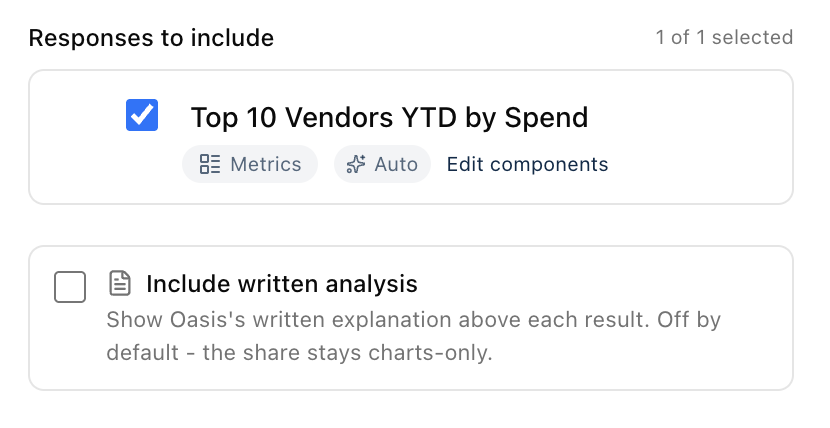
When you share a result, you can now include Oasis's written explanation alongside the charts and tables, not just the numbers on their own. Until now a shared link showed only the visuals, so whoever you sent it to saw the chart but lost the part that explained what it meant.
Look for the new 'Include written analysis' checkbox in the share window. It is off by default, so your shares stay clean and chart-only unless you decide otherwise. Turn it on and the explanation appears above each result, and the live preview shows you exactly what the recipient will see before you create the link.
If a result has no written explanation to include, the checkbox simply tells you so, so there is never any guesswork about what will be in the shared view.
New Cost Breakdowns, Sharper Numbers, and a Smoother Chat
You can now ask for the average cost of a plan or option across the homes that have it, like 'average cabinet cost per house for the Gallatin plan.' Oasis pulls the cost for every home with that plan or option and gives you the average, the total, and a per-house breakdown.
Purchase order cost totals were being over-counted in some breakdowns when a single PO was split across multiple lines, which inflated the numbers. Those totals are now correct.
When Oasis suggests tracking a result to a dashboard, that button now saves the full result to your board instead of a blank tile.
Questions about what is true right now, like 'how many homes are available for sale right now,' no longer get stuck; Oasis answers them directly.
Multi-part questions come back faster: Oasis runs independent lookups at the same time instead of one after another, and skips setup work it does not need.
Fixed several cases where a valid question would quietly retry itself before answering, so more answers come back on the first try.
Faster Spec Books and a More Dependable Chat
Oasis was unavailable twice on June 10. We found and fixed the root cause: a slow database lookup that, when it was cancelled, could quietly jam the whole app until someone restarted it. The app now cancels slow lookups cleanly, and if it ever gets stuck like that again it restarts itself instead of waiting for a person to notice.
Spec books are dramatically faster. The selections lookup behind the spec book was timing out every single time, which slowed the book down and could leave the color selections incomplete. That lookup now finishes in under a second, so the book builds quickly with the full selections data.
While Oasis works on your question, you now see what it is actually doing, like 'Reading your question' or 'Putting the report together', along with how long it has been at it, instead of a bare 'Thinking' that sits there for a minute on big reports.
Some answers were finishing but never showing up, leaving the chat stuck on 'Thinking' until you refreshed the page. Oasis now notices when that happens and brings the finished answer into the chat on its own.
Small touch: clicking + to start a new chat now puts the cursor straight in the question box so you can just start typing.
Ask for a Client-Ready Spec Book
You can now ask Oasis for a spec book in plain words, like 'create a spec book for the Allen job,' and get the full client selections specification book: project summary, price summary, deposit schedule, every selection organized by section (exterior, interior finishes, flooring, tile, cabinets, plumbing, appliances, lighting), the addendum options, and an Outstanding Items page listing what still needs a decision. The format follows the spec books the selections team already produces by hand, so there is no need to attach an example or describe the layout.
Items on the color sheet that say 'See Options' are now matched up with the addendum option that fulfills them, so the book shows the actual product the buyer purchased instead of a placeholder. Anything that could not be confidently matched goes on the Outstanding Items page rather than being guessed at.
Spec books work for jobs at any stage, including homes that have not started construction yet, which is when the selections team needs them most. The Outstanding page also knows the difference between a selection that was forgotten and a room the plan simply does not have, so the action list stays short and real.
If Oasis cannot tell which job you mean (a common last name, for example), it asks instead of guessing. And when you mention a file you shared in an older conversation, Oasis now tells you it cannot see files from other conversations and asks you to attach it again, instead of quietly producing something different from what you expected.
See the Pictures From the Standards Book
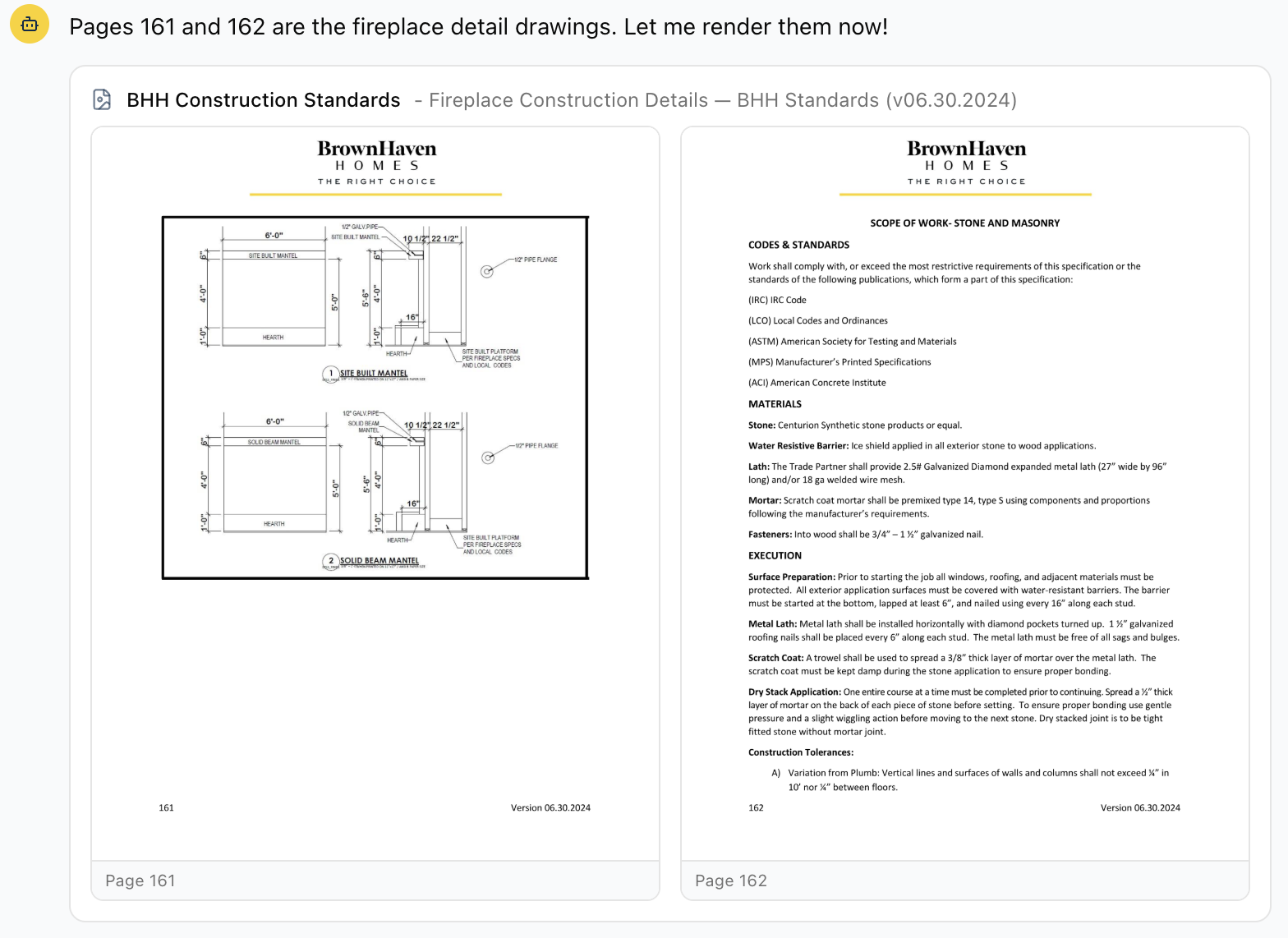
Oasis can now show you the actual pages of the Construction Standards book, pictures included. Ask to see the fireplace detail, a footing drawing, or any other diagram and the original page appears right in the chat, exactly as it looks in the book. Click a page to open it full size in a new tab.
Before this, Oasis could only read the words in the standards book. The detail drawings at the end of each chapter have no words to read, so when you asked for a picture it had to tell you it couldn't show one. Those drawings are a big part of what the book is for, so now it shows you the page itself instead.
This works across the whole standards book, every chapter's detail pages, and applies to the other reference documents loaded into Oasis as well.
Ask Oasis About HubSpot, Asana, and Avid
Oasis can now answer questions about three new sources alongside Mark Systems: your HubSpot sales contacts and deals, your Asana projects and tasks, and your Avid homebuyer satisfaction surveys. Ask things like 'how many HubSpot deals do we have by stage,' 'how many Asana tasks are still open by office,' or 'which recently settled homes have not responded to their Avid survey.'
You can cross-reference the new sources against Mark Systems in a single question. For example, match HubSpot contacts to Mark Systems prospects by email to see how many have converted to a home, or tie an Avid survey back to the settled home and community it belongs to. Oasis works out how the records line up, and tells you plainly when two sources cannot be matched reliably instead of guessing.
The new data is kept current on a schedule, and each refresh pulls only the records that changed so it stays quick. As with everything in Oasis, these sources are read-only, so nothing you ask changes anything in HubSpot, Asana, or Avid.
Selections Reviews That Catch the Real Gaps
Oasis no longer reports 'no color selections' for a job whose selections are already loaded. Mark Systems keeps a buyer's color and style choices in two places and copies them from one to the other a little while after they are entered. Oasis was sometimes reading the copy before it caught up, so a selections review or spec book could come back empty even though the selections were in. It now reads both places, so a choice shows up as soon as it is entered.
Missing-selections lists now point you at the gaps that matter. Every job carries a long list of possible selection slots, and most never apply to a given plan, so flagging every blank buried the few that were truly forgotten. Oasis now marks a blank that sits among other filled choices in the same area as a likely gap to handle first, and treats a whole area that is blank as more likely to simply not apply to that plan. A new 'Likely Gaps' count gives you the short list at a glance.
Oasis now applies Brown Haven's selection rules when reviewing a job, so it can tell which blanks are genuinely required from the ones that depend on what the buyer chose (for example, porch post paint only when wrapped columns were purchased, or terrace flex flooring only with a finished terrace). The same option-aware check looks in both places options are stored, so nothing is missed while a job is still being set up.
Open Warranty Counts Now Match Bilt
Open warranty numbers now line up with Bilt. When you asked about open warranty work, by office, by community, or company-wide, Oasis was reading the wrong part of Mark Systems and counting only the service orders that had been dispatched to a vendor. That left whole offices looking nearly empty (Clemson, Dawsonville, and Oconee were badly undercounted, and several jobs were missing entirely) while others looked too high.
Oasis now counts a warranty request the same way Bilt does, one per service issue, using the live open/closed status. We checked the new numbers against your current Bilt list office by office and they match (for example Asheville, Sylva, Dawsonville, Clemson, and Oconee all line up).
This affects open and backlog questions only. Warranty cost and spend figures were always correct and are unchanged.
A 'Try Again' Button When an Answer Doesn't Come Through
When a question fails to come back even after Oasis tries again on its own, you now get a 'Try again' button to resend it with one click, instead of a message telling you to wait a few minutes. Your question is kept, so nothing is lost.
Fixed a freeze that could happen while working in a shared conversation. Asking a question no longer locks up the page mid-answer.
Reports that turn up no matching records (for example, a filter that no vendor or category matches) now come back as a clean empty result instead of erroring out.
Pin Conversations, and Questions From the Oasis Team
You can now pin a conversation to keep it at the top of your list. Hover over any conversation in the sidebar and click the pin icon. Pinned conversations stay up top under a 'Pinned' heading, so the ones you come back to often are always right there instead of getting pushed down as you ask new questions.
The Oasis team can now ask you a question right inside the app. When we need something only you would know, like confirming a construction standard or how a particular number should be read, it shows up at the top of your list with an 'Oasis Question' badge and stays pinned there until you answer. Open it, reply in your own words, and it drops back into your normal list once you have responded.
Ask Oasis About Building Code
Oasis can now answer common building-code questions. Ask something like 'what does code require for receptacles on a kitchen island?' or 'do offices need fan bracing?' and it answers from a curated code reference and points you to the relevant code section, instead of saying it cannot help.
These answers are clearly marked as outside guidance. Oasis treats the code reference as general guidance to confirm against the code edition your jurisdiction has adopted and your local inspector, and keeps it separate from Brown Haven's own construction standards, so a code rule is never mistaken for a Brown Haven standard.
Truer Projections and Quicker Recovery
Multi-year projections now use your real numbers for years that have already closed. When you build a long-range P&L or cash-flow projection and give Oasis a target margin, it was applying that target to past years too, so a year that already closed could show a goal instead of what actually happened. Oasis now reports the booked actuals for any closed period, applies your assumptions only to future years, and labels each year as actual or projected so you can see which is which.
Follow-up questions no longer hang for a long time before giving up. In rare cases a deep follow-up in a long conversation could spin for almost two minutes and then fail with a vague message. Oasis now stops sooner and tells you clearly, so you can rephrase and try again without the long wait.
Work on a Conversation Together
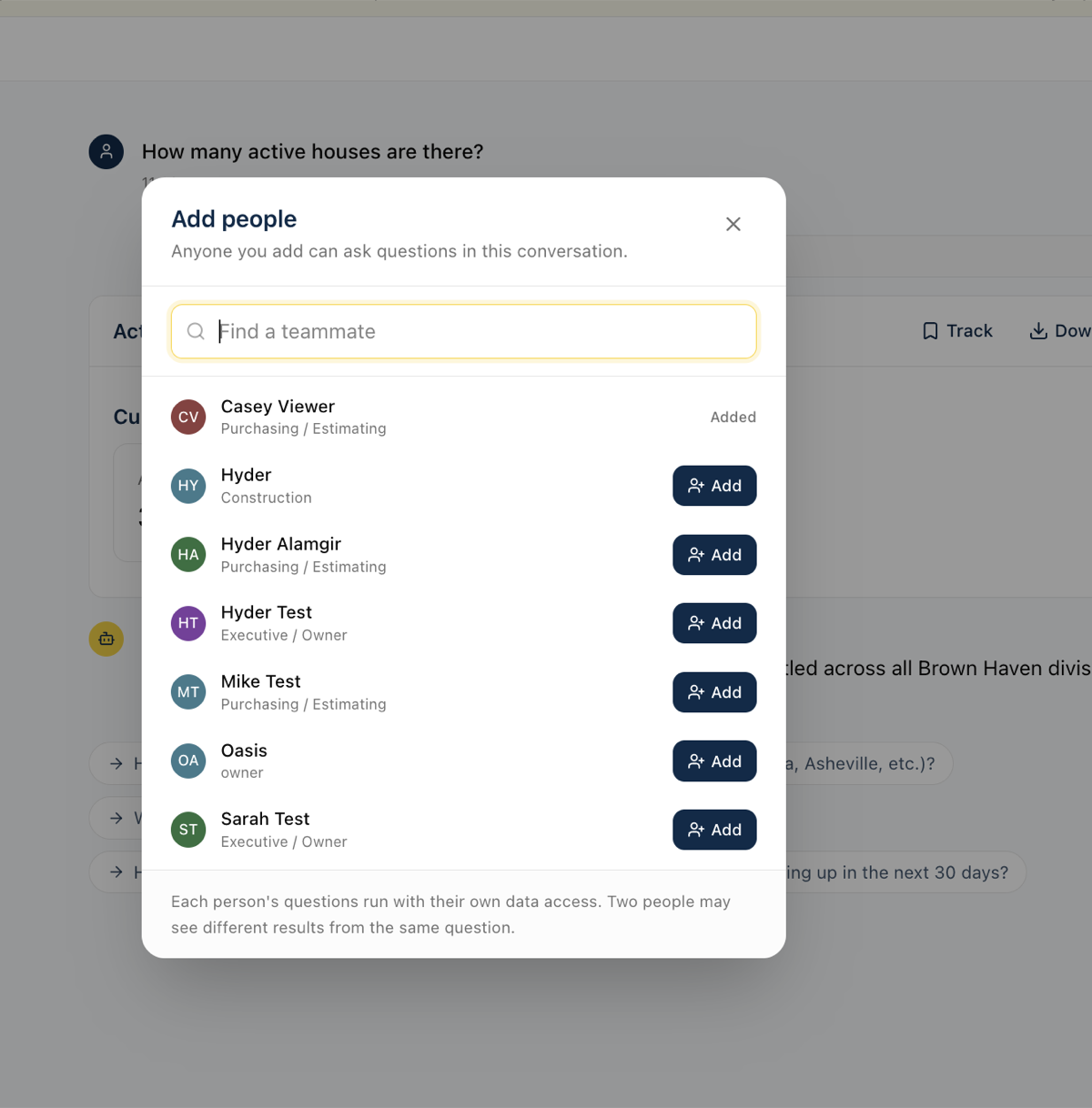
You can now bring teammates into a conversation and work a question out together. Use the new 'Add people' button at the top of any conversation to pick who you want; the conversation then shows up in their list too, and they can ask their own follow-up questions right alongside you.
Everyone sees the conversation update live. When a teammate asks something, their question and the answer appear in your view as they happen, and small avatars at the top show who is looking at the conversation with you right now.
Every question is labeled with who asked it and their role. Because each person's questions use their own data access, the same question can return different results for different people; the labels keep it clear who asked what, and a short note appears on an answer when someone's access left some data out.
Oasis answers one question at a time. If you ask while a teammate's question is still being answered, yours waits in line and sends automatically when the current one finishes. You can edit or cancel your waiting question any time before it sends.
Shared conversations are marked in your list, and a small dot appears when a teammate has added something new since you last opened it.
Only the person who started a conversation can add or remove people. Removing someone takes away their access but keeps their past questions in the history, so the record of who asked what stays intact.
More Accurate Numbers, CRM Data, and Faster Answers
Profit and margin now include land cost. Before, Oasis left the cost of the lot out of gross profit, which made margins look far higher than reality (a community could read about 56 percent when the true figure, with land included, was closer to 23 percent). It now always includes land cost, so profit and margin numbers can be trusted.
Oasis understands more of the names your team actually uses for communities. It now knows the nicknames and alternate names your team uses, so a question like 'cycle times for [community] Phase 2' gets answered right away instead of Oasis asking which community you mean or guessing wrong.
You can now ask about your CRM registrants and leads. Oasis reads your synced CRM data directly, so a question like 'how many registrants do we have' returns a real answer instead of Oasis saying it cannot reach your CRM.
Schedule answers no longer guess whether a home is ahead of or behind schedule. The meaning of a negative schedule number was being read inconsistently, so for now Oasis reports the plain variance and notes that the ahead-or-behind direction still needs to be confirmed, rather than stating it backwards.
Prospect and lead counts are more reliable. A date field that is blank on most records was quietly dropping the majority of prospects from year-to-date counts; Oasis now counts them correctly so the totals are not understated.
Answers are faster, and a few rough edges are gone. Month-by-month and date questions work on the first try more often, results render without needless retries, and Oasis no longer flags ordinary figures (like a phase name such as '1B') as if they were suspicious numbers.
Download Any Answer as a PDF
Every result Oasis shows now has a 'Download PDF' button in its header. Click it to save a clean, printable copy of that table, chart, or report, with an Oasis and company header and page numbers, ready to email, attach, or print.
Oasis now knows this is possible. If you ask for a PDF, a document, or 'a copy I can send over', it points you to the Download button instead of replying that it cannot create documents, which is what it used to do.
Each PDF carries a footer reminding everyone that the data is AI-generated and should be checked against source systems before it is used for financial reporting.
Cash Flow Forecast, On Demand
You can now ask Oasis for your cash flow forecast. Ask something like 'show me the 13-week cash flow' and you get a week-by-week table: cash coming in from home closings and bank construction-loan draws, and cash going out for construction, overhead, loan paybacks at closing, financing interest, and distributions, with a running cash balance carried forward each week.
It mirrors the manual Excel cash flow model, but builds itself from live data in your construction management system instead of the usual exports and hand calculations, so anyone can pull a current view on demand. You can look out as far as 52 weeks, and pin the forecast to a dashboard or share it like any other report.
This is a first version we are still validating with accounting, so treat it as directional for now. In particular, because your construction management system does not record a projected closing date, the forecast estimates each home's closing from its construction schedule.
Cleaner Tables and Faster Answers
Code columns no longer show up as dollar amounts. In tables like a purchase-order list or a cost breakdown, cost codes, PO numbers, and invoice numbers were sometimes formatted as money (a cost code of 365 reading as '$365.00', or an invoice number turning into a dollar figure). They now display as plain codes, so you no longer have to mentally translate them.
Answers come back faster when you mention a community, office, or division by name. Oasis now keeps a built-in directory of your communities, the office each one rolls up to, and the company it belongs to, so it no longer stops to look that up before answering. Questions like 'May sales in a given market' or 'handrail options for a community' get to the answer with less waiting.
Dashboard Tiles Stay Up to Date When You Refresh
Dashboard tiles now always show the latest numbers. Before, a tile built from a question like 'site authorizations this month' could get stuck on the day it was created and never move, no matter how many times you hit refresh, so a count that should have read 31 kept showing 28.
Time-based tiles now roll forward on their own. A tile you set up for the current month keeps counting through the end of the month and then rolls into the next month, instead of staying frozen on the month it was first added.
Refresh now actually re-runs the tile against current data. A behind-the-scenes mismatch meant some tiles silently failed to update (and a few errored out entirely); both are fixed.
If a refresh does fail, the tile now says so clearly with a 'Last refresh failed' notice and keeps showing the previous numbers, instead of looking like nothing happened.
The refresh spinner now keeps turning until the new numbers are actually on screen, so you can tell the update finished rather than wondering if your click registered.
Stuck or Blank Answers Now Recover Instead of Freezing
When the AI service has a brief hiccup, Oasis now shows a clear message and retries on its own, instead of leaving a blank reply that looked like the page had frozen. Your question is kept, so nothing is lost.
If a short connection problem happens while an answer is being written, Oasis can now route around it and still finish, where before the whole answer could fail.
Oasis no longer saves an empty reply when something goes wrong behind the scenes, so you will not find blank messages sitting in your conversation history.
Quicker, Cleaner Answers
Plain-text answers no longer get an extra, unwanted table tacked on. That also removes a roughly one-minute delay that used to happen on those replies.
Date-based questions (like 'last 12 months' or the number of days between two dates) work correctly on the first try more often, so you wait less.
When a calculation might accidentally double-count because it combined two sets of records, Oasis now catches it and corrects before answering, so totals are more trustworthy.
VPO 'SC Review' versus 'LO Discretion' breakdowns are now classified one consistent way (by cost code), so the same question gives the same numbers every time.
Construction Standards, Dashboards, and Page Fixes
Construction-standards lookups now reach the exact section you need even when a heading name (like 'Standards' or 'Execution') repeats across trades. Before, some questions dead-ended with 'I can't find that' even though the spec was in the booklet.
A dashboard tile that combines two different queries is now caught when you add it, instead of quietly showing the wrong numbers the next time it refreshes.
Metric cards now show 'No data' for an average when there are no matching records, instead of a misleading 0.
Fixed errors on the Vendors and What-If Scenarios pages so they load reliably.
What's New Shows Everything You Missed
The 'New in Oasis' banner now lists every update since you last checked, not just the most recent one. If several things shipped while you were away, you will see them all.
The banner stays on a single line so it takes up less room at the top of the screen, and the What's New page marks each update you have not seen yet with a 'New' tag.
See Who Added Each Tile
Every tile on a board now shows who tracked it, with a 'Tracked by' note in the tile footer next to the last-refreshed time. On a shared board you can tell at a glance which tiles are yours and who added the rest.
Remove a Single Tile From a Board
You can now remove one tracked tile from a board without deleting the whole board. Use the trash icon in the tile's header, next to the refresh button.
You can remove a tile if you own the board or if you are the one who tracked it, so you can take back something you added to a shared board without touching anyone else's tiles.
Removing a tile asks you to confirm first, and it only removes that one tile; the rest of the board stays intact.
Delete Boards You Created
If you created a board, you can now delete it yourself. Look for a Delete option on the board (both on your dashboards page and on the board's own page). Before this, only an administrator could remove a board, even one you made.
Deleting asks you to confirm first. If other people have added that board to their dashboards, the confirmation tells you how many, since deleting removes it for everyone, not just you.
You can only delete boards you created. Boards someone else made still show only an Unsubscribe option, which quietly removes the board from your own list without affecting anyone else.
Boards Now Refresh Themselves, and Refresh Reliably
Boards now update on their own. A board set to refresh daily updates every morning, and one set to weekly updates every Monday morning, without anyone clicking Refresh. Until now that schedule was only a label, so boards quietly went stale until someone refreshed them by hand.
Boards tied to a data sync now refresh automatically right after the latest data comes in, so what you see matches the freshly synced numbers.
Fixed a bug where refreshing certain tiles failed and left them showing an error. Tiles built from a chat result could lose track of their underlying data when refreshed; they now re-run their query correctly every time.
Tiles that can never display correctly are now caught when you add them, instead of being saved and then failing on every refresh.
Ask Questions About a Report Someone Shared With You
When someone shares a report link with you, you can now open your own copy and keep asking questions about it. Click 'Discuss this' on any shared view and Oasis hands you a private chat that starts from what was shared.
Your follow-up questions and the assistant's answers stay in your copy only. They do not change the original shared report, and the person who shared it does not see your questions.
The assistant already knows the context of what was shared, so you can jump straight to 'which item has the biggest difference?' or 'break this down by community' without re-explaining the report.
Better Link Previews for Shared Conversations
When you paste a shared conversation link into Slack, Teams, or a text message, the preview now shows that conversation's title and summary instead of the generic Oasis description. Whoever you send it to can tell what the link is about before they open it.
Opening a share link while signed out now shows the conversation's title and summary with a Sign in button, instead of dropping you on the home screen with no context.
Reliability and Query Accuracy Fixes
Error messages are now more descriptive when something goes wrong. Instead of a generic message, you will see what actually happened (provider connection dropped, response interrupted, etc.) along with the automatic retry countdown.
GL account lookups no longer crash when the account has zero activity in the lookback period. Previously, asking about an inactive GL account would show an error instead of showing zero balances.
Conversations that get stuck in a loading state now automatically recover. If a response fails to start, the conversation resets itself so you can try again without refreshing the page.
Date-based questions (like 'last 12 months' or 'cycle time in days') now work correctly on the first try more often. Previously, some date calculations needed a retry because of a syntax mismatch behind the scenes.
Purchase order queries involving house numbers or cost codes are faster and more accurate. The system now knows the correct way to link PO data to houses and cost categories without extra exploration steps.
Broader Model Support and Better Error Recovery
Oasis now works with a wider range of AI models. Previously, switching to certain models could cause responses to silently fail. Now the system handles model differences automatically so you always get an answer.
If a response fails to render after the data has already been fetched, Oasis now catches the problem and runs a recovery step instead of leaving you with a blank screen. You will see your data even when something goes wrong behind the scenes.
Every conversation turn now tracks which AI model produced it. This makes it easier to diagnose issues and compare model performance across different types of questions.
Faster Responses and Smarter Queries
Conversations are noticeably faster now. Oasis compacts earlier parts of the chat so the AI spends less time re-reading old results. Multi-turn sessions that used to slow down after 5-6 questions should stay snappy throughout.
Oasis now understands your company-specific terminology out of the box: completions (G02 orientation, not financial closing), COR codes (option codes starting with 9), site authorization stages (A08/A12), and the difference between divisions and the developments within them.
Date calculations and comparisons work correctly on the first try now. Previously, some date-related queries needed a retry because the AI used the wrong SQL function.
Count columns (completions, permits, starts, inspections) now display as whole numbers instead of sometimes showing dollar signs.
Every data table has a Download CSV button. If you ask for a spreadsheet, Oasis will point you to the download button on the table it renders.
Two new saved queries: GL Account Reconciliation (for month-end WIP audits) and Duplicate Payment Detection (flags same-vendor/same-amount payments in AP history).